Live Preview
Stay inside the editor and still see the document clearly.
Search the PDF, jump pages, fit width, fit page, refresh instantly, and move from source to preview with SyncTeX-backed navigation.
 PureTeX
VS Code Extension for LaTeX
PureTeX keeps builds, diagnostics, SyncTeX, and live PDF preview inside VS Code. Local-first by default. Fast enough to stay in flow.
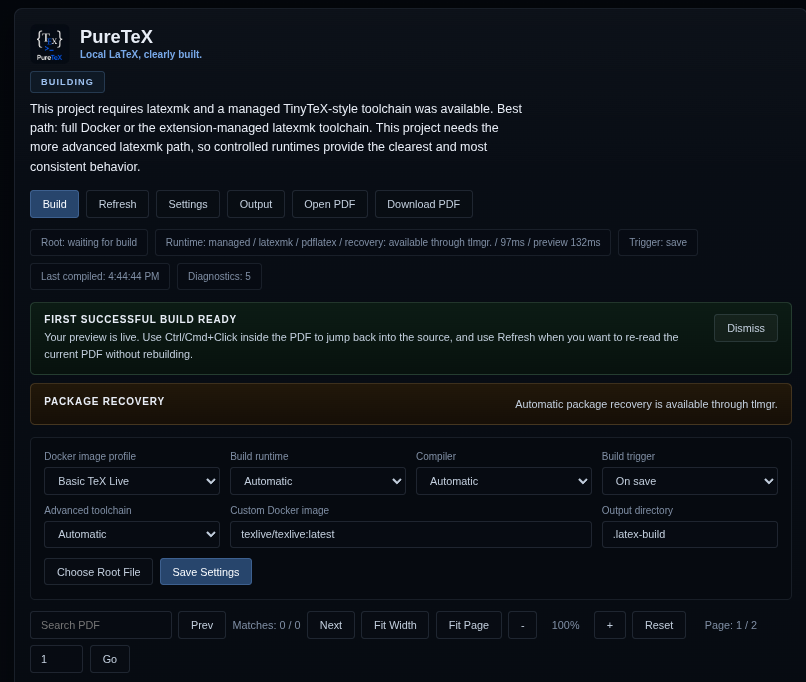
Start from the editor play button, then search, zoom, fit width, fit page, download, and open externally.
Automatic runtime selection across Docker, managed local tools, and system tooling.
SyncTeX-backed movement between PDF and source without leaving the editor.
Product Demo
Watch the extension keep the LaTeX loop inside VS Code with builds, diagnostics, and a polished live PDF preview.
Why It Feels Better
Live Preview
Search the PDF, jump pages, fit width, fit page, refresh instantly, and move from source to preview with SyncTeX-backed navigation.
Runtime Intelligence
PureTeX can choose between Docker, managed local toolchains, and system tooling so your project gets a healthier default path.
Smarter Diagnostics
Bibliography, glossary, runtime, and package-recovery issues are surfaced as actionable diagnostics instead of opaque log noise.
Root Detection
Open any file in the project and let PureTeX resolve the correct root before building.
Local-First
No cloud compiler dependency, no remote handoff required, and no context switch to another app just to keep writing.
Runtime Modes
Recommended for most users and the cleanest first-run experience.
Ideal for heavy package sets, theses, diagrams, glossaries, and reproducible setup.
Great when your machine already has the toolchain you trust.
Setup Map
Start with the Marketplace install, choose Docker or local tooling, then use the docs that match the depth you need.
Install from the VS Code Marketplace, then reload VS Code after updates.
Open Marketplace listingUse Docker for predictable builds, or local tooling when your TeX setup is already healthy.
Open a folder with `.tex` files, select any source file, and press the PureTeX play button in the editor title bar or run it from the Command Palette.
Read the usage guideUse the README for features, the engineering guide for architecture, and GitHub releases for packaged VSIX builds.
“
PureTeX gives LaTeX the kind of product polish developers now expect from modern tools: fast feedback, clear diagnostics, and a preview that feels like part of the editor instead of a bolt-on.
Designed for researchers, students, technical writers, and teams shipping real documents.
Get Started
PureTeX is built for VS Code `1.95.0+` with packaged targets for Windows x64, Linux x64, macOS Intel, and macOS Apple Silicon. It supports Docker, `tectonic`, `latexmk`, and managed local tooling depending on your setup.
ext install huzaifa.puretex
@id:huzaifa.puretex
git clone git@github.com:HN026/PureTeX.git
https://hn026.github.io/PureTeX/